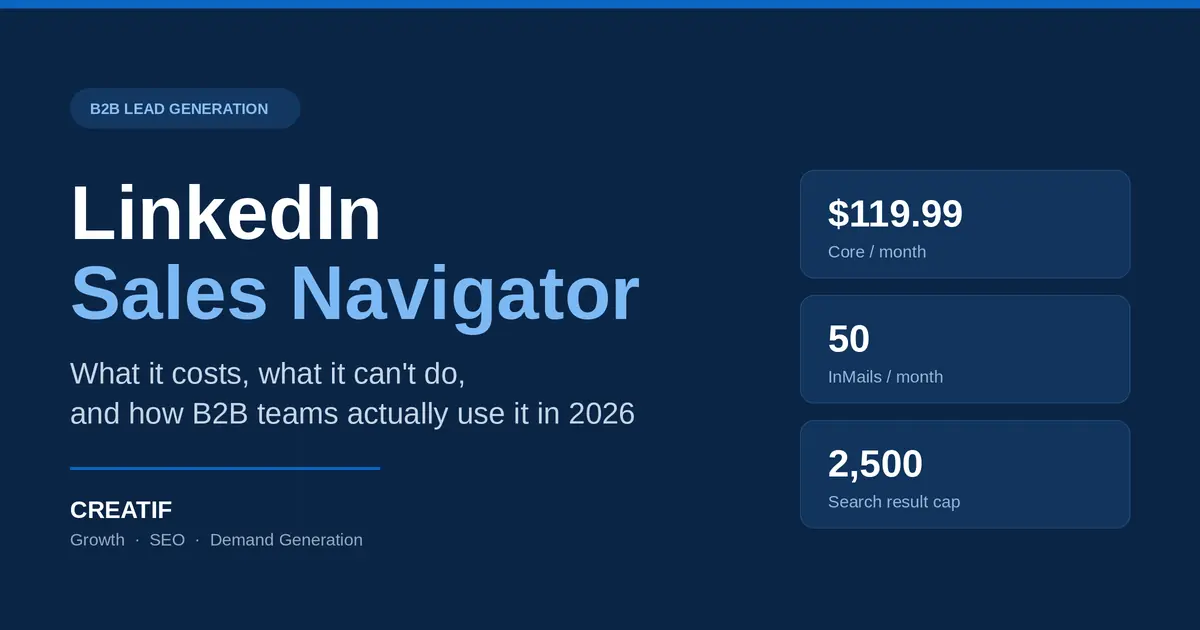
| QUICK ANSWER: LinkedIn Sales Navigator is LinkedIn’s paid prospecting tool. It unlocks 40+ advanced search filters, 50 InMail credits a month, and buyer-intent alerts that the free version does not offer. Core costs $119.99 per seat per month and Advanced costs $159.99. It is built for B2B teams selling to decision-makers — not for consumer marketing. |
| At a glance | |
| What it is | Paid B2B sales intelligence layer on top of LinkedIn |
| Plans | Core, Advanced, Advanced Plus |
| Starting price (2026) | $119.99 / seat / month |
| InMail credits | 50 per month, roll over up to 90 days |
| Saved leads | Up to 10,000 |
| Search cap | 2,500 lead results · 1,000 account results per search |
| Free trial | 30 days on Core and Advanced |
| Best for | High-value B2B sales with long, trust-based cycles |
| Not for | B2C, retail, low-ticket products |
What is LinkedIn Sales Navigator?
LinkedIn Sales Navigator is a premium subscription that sits on top of a normal LinkedIn account and turns it into a prospecting workspace. Instead of searching profiles the way any free user can, you filter LinkedIn’s professional database by job function, seniority, headcount, hiring activity and department growth — then save the people and companies that match into lists you can monitor.
Finding the right buyer is the hardest part of B2B and SME sales. Most teams lose months talking to people who cannot sign a contract. The tool’s real job is not “more leads.” It is fewer, correct leads — the ones with budget authority.
It is commonly used for:
- B2B lead generation and sales prospecting
- Account-based marketing (ABM)
- Pre-call customer and competitor research
- Territory mapping and relationship building
- Recruitment-adjacent business development
How much does LinkedIn Sales Navigator cost in 2026?
This is the question most guides get wrong because LinkedIn hides pricing behind a login and updates it without announcement. Here are the current published figures:
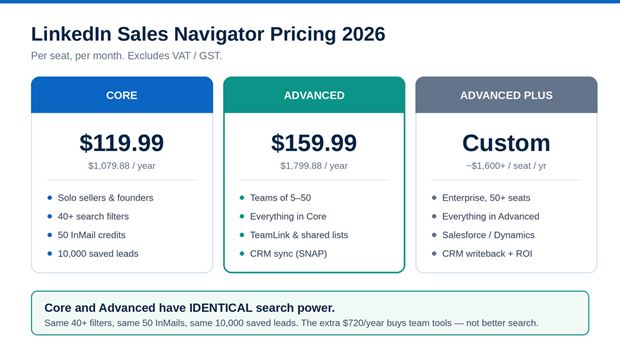
Core and Advanced share the same search power — the price gap buys team features.
| Plan | Monthly | Annual | Built for |
| Core | $119.99 / seat | $1,079.88 | Solo sellers, founders |
| Advanced | $159.99 / seat | $1,799.88 | Teams of 5–50, CRM sync |
| Advanced Plus | Custom quote | ~$1,600+ / seat / yr | Enterprise, full CRM writeback |
All three tiers include the same 50 InMail credits, the same 10,000 saved-lead ceiling and the same search filters. What you pay extra for at Advanced is collaboration and buyer intelligence — not better search. That single fact saves most small teams $720 a year.
Prices exclude VAT and GST, which LinkedIn adds at checkout. For a Dhaka-based agency, one Core seat lands at roughly BDT 14,000–15,000 a month before tax — real money for an SME, and a number worth modelling against your average deal size before you subscribe.
Sales Navigator vs regular LinkedIn: what actually changes
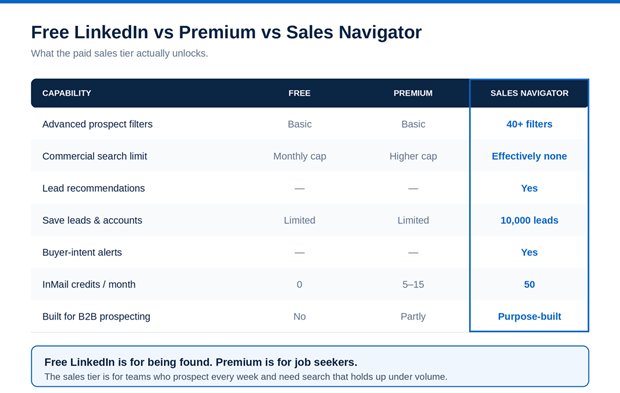
What the paid sales tier unlocks over free LinkedIn and Premium.
The honest summary: free LinkedIn is for being found. Premium is for job seekers and light outreach. The paid sales tier is for teams who prospect every single week and need the search to hold up under volume.
How does it work? The five-step prospecting workflow
The workflow is simple to describe and hard to execute:
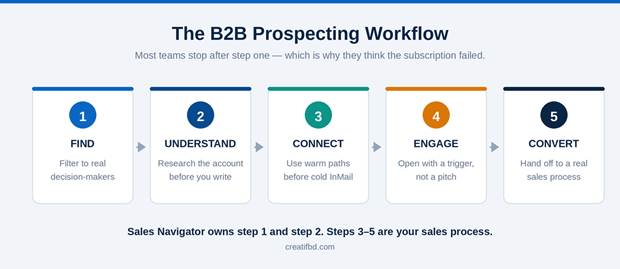
Most teams stop after “Find” — which is why they think the subscription failed.
1. Find — build a filtered decision-maker list
Search by industry, company headcount, location, job title, seniority, department, years in role and recent job change. Layer filters until the result set is a list you could realistically work through in a quarter.
A digital marketing agency selling to corporate clients in Bangladesh might build:
- Titles: CEO, Managing Director, Head of Marketing, Business Development Manager
- Industries: Real estate, manufacturing, IT services, healthcare, pharmaceuticals
- Headcount: 50–500 employees
- Location: Dhaka, Chattogram
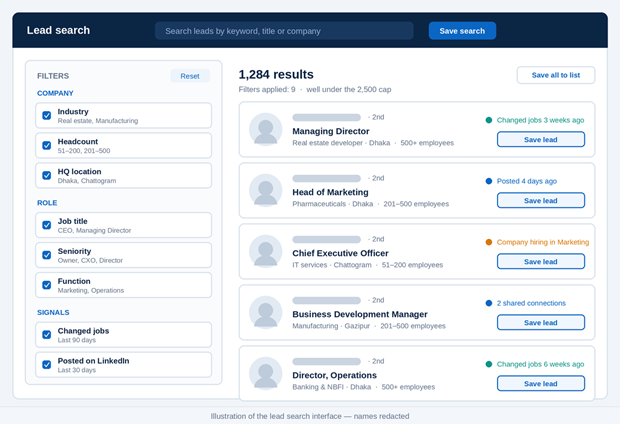
Filters stack — each one you add makes the list smaller and the list better.
2. Understand — research before you reach out
Open the saved account. Read the last three company posts, the recent hires, and any funding or expansion news. Two minutes of reading is the difference between a message that gets a reply and one that gets ignored.
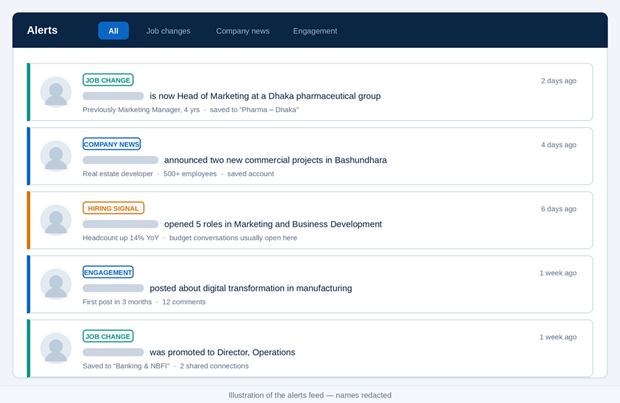
A job change is the highest-converting outreach trigger on the platform.
3. Connect — use warm paths before cold ones
Check shared connections and existing relationships first. An introduction from a mutual contact converts several times better than a cold InMail, and it costs you nothing.
4. Engage — write around a trigger, not a pitch
Do not open with your service. Open with something specific that just happened at their company.
| WEAK “Hello, we provide digital marketing services. Are you interested?” |
| BETTER “Hi Rahim — I saw Ashiana announced two new commercial projects in Bashundhara. We’ve helped three developers cut their cost-per-qualified-enquiry by running project-specific landing pages instead of one brand page. Happy to share the structure if it’s useful — no pitch.” |
The pattern: Research → Insight → Value → Ask.
5. Convert — hand off to a real sales process
The subscription ends at the conversation. Proposals, follow-ups, pricing calls and closing still belong to your sales team. Teams that call the tool “useless” almost always bought the search and never built the outreach system behind it.
Key features worth paying for
Advanced lead and account search. 40+ filters across company attributes (industry, headcount, growth stage, hiring activity, location) and personal attributes (role, seniority, tenure, recent job change).
Lead and account lists. Save individual buyers as leads and target companies as accounts. Once saved, you get notified about job changes, company updates, new posts and funding news — each one a legitimate reason to start a conversation.
InMail. 50 credits a month let you message people outside your network. Credits roll over up to 90 days, so an unused month is not fully wasted.
Buyer-intent alerts. Signals like a new decision-maker joining, a department expanding, or a company posting roles in your buyer’s function — the moments when budget conversations actually open.
Sales Navigator limits nobody warns you about
This section is why this guide exists. Every vendor blog lists the features; almost none list the ceilings you will hit in week two.
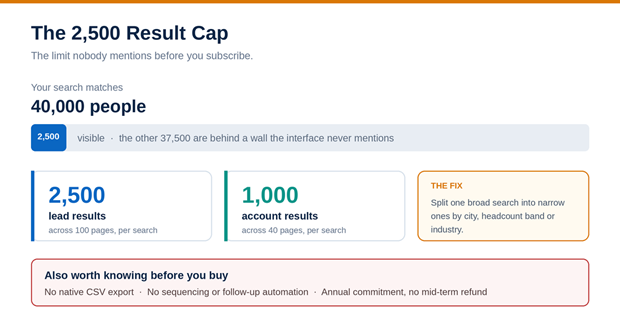
Page 100 is the wall. Split the search instead of fighting it.
The 2,500 result cap. LinkedIn caps what any single search will show you at 2,500 lead results across 100 pages, and 1,000 account results across 40 pages. If your search matches 40,000 people, you can access 2,500 of them — the rest are invisible. The fix is to split one broad search into several narrow ones by city, headcount band or industry, each returning under the cap.
No native CSV export. There is no built-in “download this list” button. Exporting requires third-party tools, which carry account-safety risk.
It finds people; it does not reach them. There is no sequencing, no follow-up automation, no email. Budget for what happens after the search.
Annual commitment. The advertised “monthly” price generally requires a yearly contract. Cancelling in month six does not refund months seven to twelve.
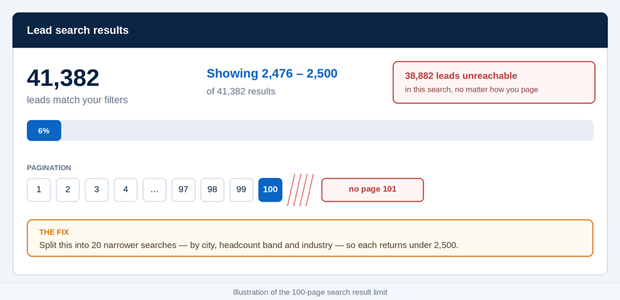
Page 100 is the wall — the remaining 38,882 leads are unreachable in this search.
Who should use it — and who should not
Good fit: B2B software, consulting firms, industrial and manufacturing suppliers, marketing agencies, commercial real estate, recruitment, and anyone whose average deal size comfortably exceeds the annual seat cost.
Poor fit: Retail and e-commerce, food and beverage, consumer services, and any business whose buyers are individuals rather than companies. If your customer does not have a work title, this is the wrong spend.
The break-even test: one closed deal per year must cover roughly $1,080. If your average B2B contract is BDT 200,000 or more, the maths works on a single win.
Using it for B2B lead generation in Bangladesh
Bangladesh needs a modified playbook, and most global guides ignore this entirely.
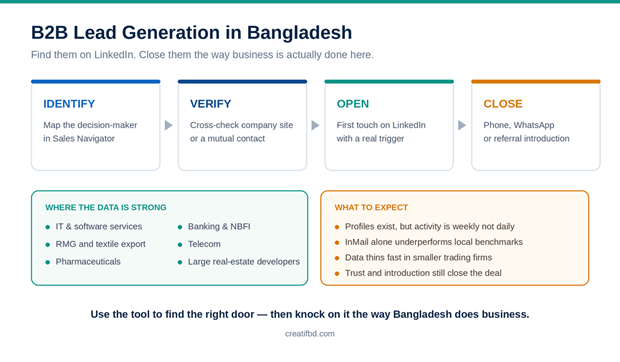
Find them on LinkedIn. Close them the way Bangladesh does business.
Profiles exist; activity is lower. Senior people at local corporates maintain LinkedIn profiles but often check them weekly, not daily. Treat the platform as a mapping and research layer, then move the conversation to the channel your buyer actually lives in.
Multi-channel follow-up is not optional. The realistic Bangladesh sequence is: identify the decision-maker here → verify with the company website or a mutual contact → reach out on LinkedIn → follow up by phone, WhatsApp or a referral introduction. InMail alone will underperform local benchmarks.
Sectors where the data is strongest: IT and software services, RMG and textile export, pharmaceuticals, banking and NBFI, telecom, development and NGO sector, and larger real estate developers. Data quality thins out fast in smaller trading and manufacturing firms.
Relationships still close deals. Trust and personal introduction drive B2B buying in this market more than any automated sequence. Use the tool to find the right door — then knock on it the way business is actually done here.
Is LinkedIn Sales Navigator worth it?
It is worth the money when all four of these are true:
- You sell B2B products or services
- Your buyers are named decision-makers, not anonymous consumers
- Your sales cycle depends on trust and multiple touches
- Your average deal value is high enough to justify roughly $1,080 a year
It is not worth it if you rely mainly on consumer marketing, if nobody on the team will use it weekly, or if you have no follow-up system to catch the leads it surfaces. The tool is a targeting instrument. It does not sell for you.g, because LinkedIn hides pricing behind a login and updates it without announcement. Here are the current published figures: