If you recently tried to add an Admin or Moderator to your Facebook Page, you probably noticed that Facebook page access looks different. The old “Page Roles” option does not look the same anymore. The standard admin / moderator options are no longer available like before.
So naturally, many people are asking:
Did Facebook remove Admin and Moderator roles for Pages?
It’s not quite as simple as yes or no. Facebook did not completely remove Page management permissions. Instead of the previous Page Roles system, a new Facebook Pages Access system within the New Pages Experience was introduced by meta.
In this guide you will learn:
- What changed in Facebook Page roles
- What Facebook Page Access and Task Access mean
- How Full Control works
- Whether Admin and Moderator roles still exist
- How to add someone to a Facebook Page in 2026
What Changed in Facebook Page Access?
For many years, Facebook Pages had a system known as Page Roles.
Page owners could assign roles like:
- Admin
- Editor
- Moderator
- Advertiser
- Analyst
However, with the introduction of the New Pages Experience, Meta began to replace these roles with a new permission system:
- Facebook Access
- Task Access
- Full Control
- Partial Control
According to Meta’s official Help Center, users can now give trusted people either Facebook access or task access to help manage a Page. This is the main reason why many users believe Facebook deleted Admin and Moderator roles.
Did Facebook Remove Admin and Moderator Roles?
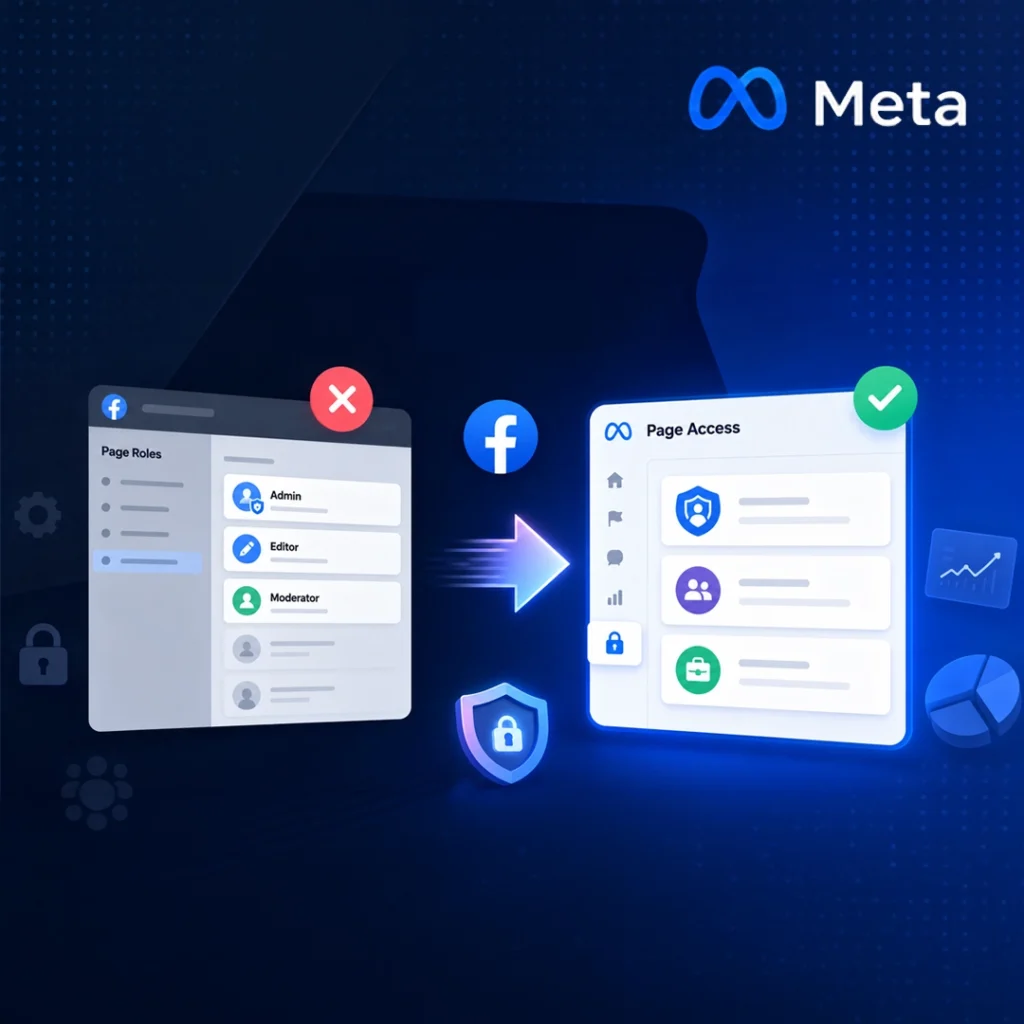
Facebook didn’t entirely take away the Page management permissions. But, Meta has replaced the old Page Roles system with the newer Page Access system.
That means:
- You may not see “Admin” anymore
- You may not see “Moderator” like before
Rather, you now find:
- Facebook Access
- Task Access
- Full Control
- Partial Control
So while the old role names are disappearing in many places, the permissions themselves still exist under new structures.
What Is Full Control?
Full Control is similar to the previous Admin role.
With full control of Facebook access people can:
- Manage settings
- Control the Page’s status and visibility
- Add or remove other users Control who can access Page
In simple terms: Full Control = Modern version of Admin access.
That is why many businesses are now opting for Full Control as opposed to the old Admin label.
What Is Partial Control?
Partial Control gives limited management abilities.
The person with Partial Control can assist with:
- Content management
- Messaging
- Community activity
However, they don’t have the ability to completely control Page settings or delete other users.
What Is Task Access?
Task Access is not Facebook Access.
Task Access generally does not allow people to switch into the Page directly on Facebook.
Rather, they carry out particular tasks via:
- Meta Business Suite
- Ads Manager
- Business Manager
- Creator Studio
Task Access can include permissions as follows:
- Ads
- Insights
- Content
- Messages
- Community activity
This system is primarily intended for agencies, marketers and team members who require limited access to the business.
Is Task Access the Same as Moderator?
Not exactly.
Many people assume: Moderator = Task Access
However, it’s not entirely correct.
Moderator-style work can be managed via:
- Task Access
- Partial Control
- Community Manager Access
Depending on the work involved.
For instance, Meta also has Community Manager permissions for live stream moderation and community interaction. So the old Moderator role no longer exists in the same simple format as before.
Why Did Meta Change the Old Page Roles System?
Meta is making an effort to develop a more secure and business-oriented permission system.
The new structure helps:
- Improve security
- Reduce unauthorized access
- Support agencies and teams
- Integrate with Meta Business Suite
- Separate business tasks from full ownership control
This will be particularly useful for businesses that have more than one Page and employees.
How to Add Someone to a Facebook Page in 2026
If you want to add someone to your Facebook Page now, the process is different from the old Admin role system.
The new process is as follows:
Step 1: Switch into your Facebook Page.
Step 2: Go to: Settings & Privacy → Settings
Step 3: Click: Page Setup → Page Access
Step 4: Select: Add New
Step 5: Select the type of permission:
- Facebook Access
- Task Access
- Full Control
- Partial Control
Depending on what access the person needs.
Read our full step-by-step guide on how to safely add someone to a Facebook Page in 2026.

Old Facebook Page Roles vs New Page Access
| Old System | New System |
| Admin | Facebook Access with Full Control |
| Editor | Partial Control or Task Access |
| Moderator | Task Access / Community Access |
| Advertiser | Task Access |
| Analyst | Task Access |
This table is not a one-to-one replacement, but it gives an idea of how the new system works.
Important Note About Business Portfolio
Your permission system might be different if your Facebook Page is linked to a Business Portfolio within Meta Business Suite.
In that case:
- Business Settings can be used to control access settings
- Some users may only receive business-level permissions
- Task Access may become more common
This is why different businesses sometimes see different access options.
Why Many Users Are Confused in 2026
Thousands of users continue to look up:
- “Is there no longer a Facebook Admin role?”
- “Where is Facebook Moderator role?”
- “Why can’t I add Admin to Facebook Page?”
- “Facebook Page roles disappeared”
The mix-up occurs because Meta updated both:
- The interface
- The terminology
Older tutorials and YouTube videos may no longer be relevant to the current system.
Confused about Facebook Page Access?
Modern businesses need modern access control.
Creatif helps brands manage Meta Business assets securely and professionally.
Secure Your Business Access Today. Book a consultation with us.
FAQ
Can I still add an Admin to a Facebook Page?
Yes, but the system now uses Facebook Access with Full Control instead of the old Admin label.
Did Facebook completely remove Moderator roles?
The traditional Moderator role is no longer commonly used in the New Pages Experience. Similar tasks are now handled through Task Access or Community permissions.
What is the difference between Facebook Access and Task Access?
Facebook Access allows someone to directly manage the Page on Facebook. Task Access is limited to business tools like Meta Business Suite or Ads Manager.
Why can’t I see the Page Roles option anymore?
Meta replaced the old Page Roles system with the Page Access system in the New Pages Experience.